
Send Official Transcript
What is the Send Official Transcript feature?
This feature allows you to send your official Woolf transcript directly to an evaluation agency, university, employer, or any other institution via the Woolf Registrar’s email, thereby eliminating the need to print, scan, or contact support. You can use this feature at any time from the Documents & ID page in AMS.
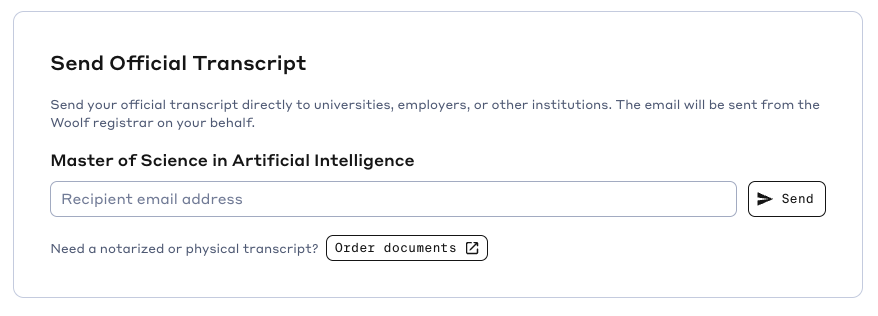
Where do I find this feature?
Go to Documents & ID in the left sidebar of your AMS account . Scroll down to the Send Official Transcript section. You'll see it listed under your degree.
How do I send my transcript?
Go to Documents & ID in the left sidebar.
Under Send Official Transcript, find your degree.
Enter the recipient's email address in the field provided.
Click Send.
Note: The recipient will receive your official transcript directly from the official Woolf Registrar email address.
Who can I send my transcript to?
You can send it to anyone — a credential evaluation agency, a prospective employer, a professional licensing body, or any other institution that has requested it. Just enter their email address.
Is the transcript sent immediately?
Yes. Once you click Send, the transcript is dispatched to the recipient's email address right away.
How up to date is my transcript?
Your transcript is updated dynamically as you complete courses. It reflects your most current academic record at the time of sending. You can also download the latest version yourself from the same page.
Can I send my transcript before I finish my degree?
Yes. You can send your transcript at any stage of your degree. It will show all courses completed up to that point. This is useful for scholarship applications, employer verification, or transfer credit requests.
What does the recipient receive?
The recipient receives an email with your official transcript. The transcript is issued by Woolf and reflects your enrollment, completed courses, grades, and credit hours.
Does it cost anything to send my transcript by email?
No. Sending your transcript by email through the AMS is free.
I need a physical or notarized copy. Can I get that?
The Send Official Transcript feature sends transcripts electronically. If you need a printed, notarized, or apostilled copy, visit the Woolf Shop at shop.woolf.university to order physical documents.
Can I send my transcript to multiple recipients?
You can send to one recipient at a time. To send to multiple people, simply repeat the process with each recipient's email address.
Can the recipient verify that the transcript is genuine?
Yes. Transcripts sent through Woolf AMS are official documents issued by Woolf. If a recipient needs to verify authenticity independently, they can contact Woolf Support at support@woolf.education.
Can I share my transcript publicly instead of emailing it?
Yes. The Public Profile & Sharing section on the same Documents & ID page lets you toggle your transcript visibility on your public credentials page. You can then share your public profile link with anyone. Note: this shows your transcript on a web page rather than sending a formal email delivery.
My transcript looks incomplete or incorrect. What should I do?
Your transcript updates automatically as courses are marked complete. If you believe there is an error — for example, a completed course is not reflected — contact Woolf Support at support@woolf.education with details of the discrepancy.